Dog Friendly Cafe Wall Clock Laser Cut: A Creative Timepiece for Pet Lovers
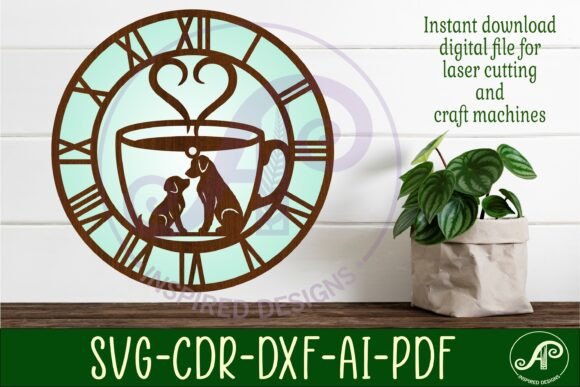
Adding a personal touch to your space is more than just about aesthetics—it’s about expressing your personality and passions. For dog lovers and cafe owners alike, the Dog Friendly Cafe Wall Clock Laser Cut offers a unique way to blend both interests into one stunning design. This digital download features three wall clock face templates, each crafted with attention to detail and ready to be brought to life using laser cutting technology. Whether you're an entrepreneur looking to enhance your cafe's decor or a hobbyist exploring creative DIY projects, this product provides a versatile and customizable option.
What Is the Dog Friendly Cafe Wall Clock Laser Cut?
The Dog Friendly Cafe Wall Clock Laser Cut is a set of digital files designed for laser cutters, CNC routers, and other compatible craft machines. It includes SVG, DXF, AI, PDF, and CDR formats, making it accessible for a wide range of users regardless of their preferred software. The recommended size for cutting is between 25 to 50cm, with the default file saved at 29cm (11.4 inches) in width. Each template has a center hole of 8mm to accommodate standard clock hands, ensuring that once you complete the cut, assembly is straightforward.
This design is ideal for those who want to create a handmade yet modern timepiece that reflects their love for dogs and cozy cafes. As a digital-only product, it allows instant access through a downloadable zip folder, enabling quick start-up on your next crafting project without waiting for physical goods to arrive.
Why People Love It
- Customization: You can choose materials like wood, acrylic, or MDF to match your interior style.
- Professional Quality: Designed in CorelDraw and tested on LightBurn, the files are optimized for clean cuts and precision.
- Instant Download: No shipping delays—just download and start working right away.
- Handmade Appeal: Perfect for small businesses or home decor enthusiasts aiming to add a personal, artisanal feel to their environment.
Common Mistakes to Avoid When Using Dog Friendly Cafe Wall Clock Laser Cut Files
While the Dog Friendly Cafe Wall Clock Laser Cut is user-friendly, there are several pitfalls that even experienced crafters might overlook. Here are some common mistakes and how to avoid them:
Misunderstanding File Formats
One of the most frequent errors occurs when users don’t understand which file format works best with their machine or software. Although the package includes multiple file types, not all programs support every format equally. For example, while SVG is great for many laser cutters, if you're using CorelDraw, the CDR file will give you the most flexibility for editing and customization.
Better approach: Before purchasing, confirm which software and machine you’ll use. If you're unsure, consider experimenting with the free trial versions of tools like LightBurn or Inkscape to see how the files render and behave during the cutting process.Ignoring Recommended Cutting Sizes
Another oversight is attempting to scale the design beyond the recommended 25–50cm range. While it might seem tempting to make a larger version for impact, scaling too much can distort the proportions or reduce the clarity of the intricate details in the dog-themed elements.
Example: A customer scaled the 29cm file to 70cm and found that the fine lines around the paw prints became jagged and unattractive after cutting. The result was a less professional-looking piece that didn't meet their expectations. Solution: Stick to the suggested dimensions unless you have experience adjusting vector artwork without losing quality. If you do need a different size, test it on a scrap material first to ensure the design remains intact and visually appealing.Not Preparing Materials Properly
Many beginners assume that any wooden board will work, but the thickness and type of material can significantly affect the final outcome. Thicker boards may require deeper settings or multiple passes, while overly thin materials could warp or break during the process.
Tip: Use a material that’s between 3–6mm thick for optimal results. Also, ensure the surface is smooth and clean before importing the design to avoid uneven cuts or misalignment.Overlooking Assembly Instructions
Though the digital files provide the design, they don’t always include step-by-step instructions for assembling the finished clock. Some users assume that simply attaching clock hands is enough, but proper mounting and finishing touches (like painting or sealing) can elevate the look and durability of the piece.
Real-world scenario: One user printed the design onto MDF but skipped the sealing step. After hanging it in their pet-friendly café, the wood absorbed moisture from the air and warped over time, ruining the appearance and functionality of the clock. Advice: Always review online tutorials or forums related to similar laser-cut clocks. These resources often offer helpful tips on painting, gluing, and securing the inner mechanisms properly.How to Make the Most Out of Your Digital Files
To maximize the potential of your Dog Friendly Cafe Wall Clock Laser Cut, follow these practical steps:
- Choose the Right Software: If you’re new to laser cutting, start with beginner-friendly platforms like Adobe Illustrator or Inkscape. The AI and SVG files included are well-suited for these tools.
- Test on Scrap Material: Before cutting your final piece, run a test on a smaller sample to adjust laser speed and power settings for your specific material.
- Enhance with Colors or Textures: Consider adding paint, stains, or varnishes to highlight the dog motifs and cafe elements. This extra step can transform a simple clock into a showpiece.
- Include a Personal Touch: Add names, dates, or custom messages to personalize the clock for gifts or business branding. The editable nature of the AI and SVG files makes this easy to achieve.
What to Check Before Purchasing or Using the Files
Before downloading or using the Dog Friendly Cafe Wall Clock Laser Cut files, ask yourself the following questions:
- Do I have access to a laser cutter or CNC router? If not, can I find a local workshop or maker space that does?
- Am I familiar with the software required to open and edit the file types included (SVG, DXF, AI, etc.)?
- Have I considered the cost of materials and any additional tools needed for assembly?
- Will the final product fit the intended space and serve its purpose effectively?
Answering these questions helps prevent unnecessary frustration and ensures you get the most out of your purchase. Remember, the beauty of this design lies in its adaptability—but only if you plan ahead.
Comparing Laser-Cut Clock Designs: Why This One Stands Out
In the world of laser-cut wall clocks, there are countless designs available, but few combine thematic creativity with such a high level of technical readiness as the Dog Friendly Cafe Wall Clock Laser Cut. Many generic clock files lack the depth of detail or the compatibility across various machines, leading to inconsistent results. Others may not include multiple file types, limiting your ability to tweak the design before cutting.
This product stands out because it’s been developed with real-world testing in mind. The inclusion of both filled and outline SVG options gives you control over the visual style, whether you prefer a bold graphic or something more subtle. Additionally, the templates are pre-optimized for popular laser cutter software, reducing the learning curve for newcomers.
Use Cases for Different Audiences
Whether you're a small business owner or a weekend crafter, this design fits a variety of needs:
- Entrepreneurs: Showcase your brand in a pet-friendly café by incorporating your logo into the clock face or using branded colors.
- Bloggers & Marketers: Create engaging content by showcasing the clock-making process or gifting personalized versions to followers.
- Freelancers & Educators: Use the design as part of a portfolio piece or classroom project to teach design principles and laser cutting techniques.
- Hobbyists & Home Decor Enthusiasts: Build a custom wall clock to display in your living room or office, combining your love for dogs with functional art.
Final Thoughts on Enhancing Your Space with This Design
The Dog Friendly Cafe Wall Clock Laser Cut is more than just a decorative item—it’s a conversation starter and a reflection of your interests. By understanding the nuances of the file formats, preparing your materials correctly, and avoiding common mistakes, you can ensure a smooth and rewarding crafting experience.
As a digital product, it also aligns well with today’s fast-paced lifestyle. Instant downloads mean you can begin your project the same day you buy it, and the variety of file types caters to both beginners and seasoned professionals. With the right preparation and mindset, you’ll end up with a beautiful, handcrafted clock that adds charm and character to any space.
So, before you dive in, take a moment to assess your tools, materials, and goals. This thoughtful planning will help you avoid costly errors and lead to a successful creation. Embrace the joy of crafting and let your love for dogs and cafes shine through this unique design.