Dragon Wall Art Sign, SVG File. Vector
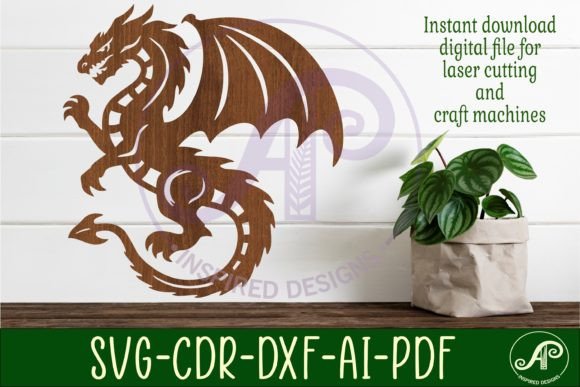
The Dragon Wall Art Sign, SVG File. Vector is a digital design intended for laser cutting and other craft machines. It offers an elegant and mythical aesthetic that appeals to many who want to add a touch of fantasy or symbolism to their home decor, business branding, or creative projects. This file format versatility makes it a popular choice among hobbyists, small business owners, and professional designers alike.
What You Need to Know About the Dragon Wall Art Sign
This product is not a physical item but rather a digital download, which means you receive a set of files ready for use on your preferred crafting machine. The design comes in multiple formats including SVG, DXF, AI, PDF, and CDR, allowing for seamless integration into various software platforms such as Adobe Illustrator, CorelDraw, or any laser cutter-compatible program.
One of the key features is its scalability — the recommended size for cutting is between 20cm and 50cm tall, with 25cm (10 inches) being the default. This flexibility ensures that whether you're making a small decorative piece or a large statement sign, the design can be adjusted to fit your needs.
Common Mistakes When Choosing and Using Digital Cut Files
Many users overlook the importance of understanding their machine's capabilities before purchasing or downloading a design like the Dragon Wall Art Sign, SVG File. Vector. A mismatch between the design’s complexity and the machine’s settings can lead to poor results or even damage to the material being cut.
- Misjudging File Compatibility: Not all vector files work perfectly across different software or machines. Always confirm that your system supports the listed file types — SVG, DXF, AI, PDF, and CDR — especially if you’re using older equipment or untested programs.
- Ignoring Line Colors for Laser Cutting: The blue lines in the file are specifically marked for exterior cuts. If these are not recognized by your software or machine, the final output may be inaccurate or unusable. Some systems require line color calibration before processing.
- Assuming One Size Fits All: While the design is scalable, resizing without adjusting the stroke weight or detail scale can cause elements to become too thin or distorted. For example, reducing the dragon’s eye to an extremely small size might make it hard to distinguish after cutting.
- Overlooking Material Suitability: The type of material you choose to cut (wood, acrylic, metal, etc.) will affect the outcome. Harder materials may require slower speeds or more power, so always review the specifications of both your machine and the material before proceeding.
How These Errors Impact Your Project
Choosing the wrong file type or failing to prepare your machine properly can lead to wasted time and materials. For instance, if you attempt to use an AI file on a CNC router without converting it to a compatible format, the machine may misinterpret the design entirely, resulting in a failed project.
Similarly, if the blue cut lines aren't correctly recognized during import, your final piece could look incomplete or messy. This is especially important when creating signs for commercial purposes, where presentation plays a critical role in customer perception.
Practical Tips to Avoid Common Pitfalls
To ensure a smooth experience when working with the Dragon Wall Art Sign, SVG File. Vector, consider the following advice:
- Verify Software and Machine Compatibility: Before purchasing, check that your software can open the included file types. If you're unsure, reach out to the seller for clarification. For example, if you're using Inkscape, confirm that the SVG version provided is compatible with that platform.
- Test at Recommended Sizes First: Start with the suggested 25cm (10 inches) height. This allows you to see how the details translate from screen to cut. Once satisfied, you can confidently resize the design for larger or smaller projects.
- Check Line Colors and Layers: Open the file in your software and inspect the layers and colors. Ensure that the blue lines are designated as cut lines and not just visual guides. Adjusting these settings manually can save hours of troubleshooting later.
- Use Preview Features: Most laser-cutting software includes a preview mode that shows how the machine will interpret the file. Use this feature to spot potential issues before starting the actual cut process.
- Review Material Guidelines: Consult your machine's manual for the best settings for your chosen material. For example, cutting through thick wood may require higher wattage or slower speed than thinner plastic.
Real-World Applications and Better Approaches
Imagine a small business owner looking to create a unique logo for their shop entrance. They purchase the Dragon Wall Art Sign, SVG File. Vector and try to import it directly into their laser cutter without checking compatibility. The result is a poorly cut image with missing parts. By instead first importing the file into Adobe Illustrator to verify layer settings and exporting to a known-compatible format like DXF, they can avoid this issue altogether.
Another scenario involves a DIY enthusiast who resizes the dragon design to double its original height but doesn’t adjust the stroke widths. The final product looks stretched and lacks the crispness of the original. A better approach would be to use the “scale proportionally” option in the software and then manually check the smallest details, ensuring they remain visible and intact after scaling.
Before You Buy: What to Check
When considering the Dragon Wall Art Sign, SVG File. Vector, take a moment to assess the following:
- File Format Support: Confirm your machine or software supports SVG, DXF, AI, PDF, and/or CDR files. If not, ask the seller if they can provide an alternative format or conversion guidance.
- Design Resolution and Detail: Look for high-resolution vector designs that maintain clarity at different sizes. A good vector file should retain sharp lines and intricate details even when scaled up.
- Software Requirements: Some advanced features may only work in specific software versions. For example, certain effects in AI files might not render properly in basic versions of Adobe Illustrator.
- Delivery Method: Since this is a digital download, ensure you have a stable internet connection and sufficient storage space to download and extract the ZIP folder immediately after purchase.
- Support and Instructions: Reputable sellers often include instructions or offer support for common issues. Make sure this information is available before buying, especially if you're new to laser cutting.
Why This Design Works Well for Various Projects
The Dragon Wall Art Sign, SVG File. Vector is ideal for a range of applications, from personalized gifts to commercial signage. Its clean lines and bold imagery make it stand out on materials like wood, acrylic, and MDF. The filled SVG format also allows for easy engraving or painting after cutting, giving you room for customization.
For educators or workshop leaders, this file serves as an excellent teaching tool for demonstrating how vector graphics function in laser cutting environments. Beginners can learn about scaling, layer recognition, and machine settings while working on a visually appealing project.
Final Thoughts on Digital Wall Art Files
Working with digital wall art files requires attention to detail and a bit of preparation. The Dragon Wall Art Sign, SVG File. Vector is a versatile and beautiful option that can enhance your creativity — but only if used correctly. Taking the time to understand your tools and the design specifics can prevent frustration and improve the overall quality of your finished piece.
Whether you're a seasoned crafter or just getting started, this file is a valuable addition to your collection. Just remember to cross-check compatibility, test before committing, and don’t skip the basics of machine operation. With these steps, you’ll unlock the full potential of the Dragon Wall Art Sign and bring your vision to life with precision and style.