Peacock 3D SVG Multilayer Laser Files for Stunning Craft Projects
Crafting enthusiasts and professionals alike are always on the lookout for innovative designs that elevate their creations. The Peacock 3D SVG Multilayer Laser Files offer just that — a beautifully intricate, multilayered design perfect for cutting machines and laser tools. This stunning peacock mandala is more than just an artistic pattern; it’s a versatile resource that opens up a world of possibilities for home decor, gifts, branding elements, and educational projects.
What Makes These Files Special?
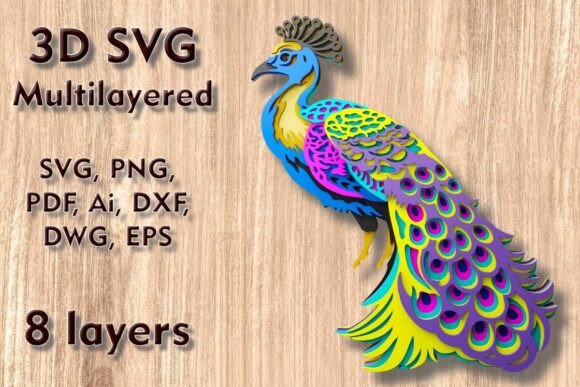
The Peacock 3D SVG Multilayer Laser Files feature a detailed 3D-style peacock mandala composed of 8 distinct layers. Each layer adds depth and complexity to the final piece, making it ideal for creating eye-catching wall art or layered decorations. The original size of the design is 250 x 250 mm (9.9 x 9.9 in), which can be easily scaled up without compromising quality. However, scaling down requires caution due to the presence of thin, delicate elements that may become fragile when reduced too much.
These files are compatible with a wide range of materials including:
- Plywood
- Paper and cardstock
- MDF
- Wood
- Acrylic
- Cardboard
- Aluminum
This flexibility allows you to experiment with textures and finishes, tailoring the project to your specific needs and preferences. Whether you're using a Cricut, Silhouette, Glowforge, or CNC machine, this design works seamlessly across platforms.
Home Decor & Wall Art
Transform your living space with elegant, handcrafted wall art. The peacock motif is timeless and symbolizes beauty, grace, and renewal. Using these SVG files, you can create layered peacock designs that add dimension and visual interest to any room. Simply cut each layer from different colored woods or acrylics, stack them carefully, and display the finished piece as a focal point on your wall or behind glass in a shadowbox frame.
Event & Wedding Decorations
Weddings and special events often require unique, custom-designed décor. The Peacock 3D SVG Multilayer Laser Files can be used to craft centerpieces, signage, or even table runners. For example, you could print the design onto metallic paper, cut it out with a Silhouette Cameo, and glue it onto cardboard backing for a shimmering effect. Alternatively, engrave it into wood or acrylic for a more rustic or modern look, depending on the event's theme.
Gift Making & Personalized Items
Looking to give a thoughtful, handmade gift? These files make it easy to produce personalized items such as greeting cards, photo frames, or decorative boxes. With a layered approach, you can highlight certain parts of the peacock by using contrasting colors or materials. A peacock-themed box made from stained MDF would serve as a beautiful keepsake, while a paper version could be given as a thank-you card or birthday surprise.
Branding & Business Applications
For entrepreneurs and marketers, the peacock design offers a creative way to represent brands. It can be incorporated into product packaging, promotional displays, or office décor. Imagine a boutique using a laser-cut peacock sign made from aluminum to stand out in a store window. Or a coffee shop adding a wooden peacock mural to its walls to reflect a nature-inspired brand identity. The design’s elegance makes it suitable for both high-end and casual environments.
Educational & Classroom Projects
Teachers and educators can use these SVG files to introduce students to design thinking, craftsmanship, and technology. In art classes, students can explore color theory and layering techniques. In STEM lessons, they can learn how digital files translate into physical objects through laser cutting or CNC routing. The design is also great for collaborative projects, where each student can work on a different layer before assembling the final product.
File Formats & Compatibility
After purchasing the Peacock 3D SVG Multilayer Laser Files, you’ll receive a ZIP folder containing multiple file formats. This ensures compatibility with various software and machines:
- SVG – Ideal for most cutting machines like Cricut and Silhouette.
- DXF/DWG – Perfect for CNC routers and CAD programs.
- EPS/AI – Great for professional editing in Adobe Illustrator or similar vector editors.
- PNG/PDF – Useful for visual previews or printing templates.
Having access to these diverse formats means you can customize the design further if needed. For instance, you might want to adjust line weights for laser etching or modify spacing for a particular material thickness.
Why Choose Layered SVG Files?
Layered SVG files provide a significant advantage over flat designs. They allow for precise control over each component of the artwork, enabling users to fine-tune spacing, alignment, and nesting for optimal material usage. This is especially important when working with expensive materials like acrylic or aluminum, where minimizing waste is key to efficiency and cost-effectiveness.
Additionally, the ability to separate layers simplifies the assembly process. You won’t have to worry about intricate parts being lost within complex shapes. Each layer can be labeled and stacked independently, ensuring a clean and organized workflow from cutting to finishing.
Design Tips and Considerations
Here are some practical tips for getting the best results with your Peacock 3D SVG Multilayer Laser Files:
- Material Thickness: Ensure that each layer is cut from a consistent thickness of material. This helps maintain symmetry and makes stacking easier.
- Color Coordination: Use complementary colors or gradients to enhance the peacock’s visual appeal. Try alternating between dark and light tones for a striking contrast.
- Adhesive Choice: When assembling the layers, opt for strong but flexible adhesives like double-sided foam tape or clear epoxy to prevent warping.
- Lighting Effects: If using acrylic layers, consider backlighting the design for a magical glow. This can be achieved with LED strips or small spotlights.
- Testing First: Always test the design on scrap material before committing to the final project. This helps identify potential issues with thin sections or registration marks.
Real-World Examples
Many users have successfully turned these files into standout projects. One hobbyist created a set of three-tiered wooden peacock coasters, each layer painted differently to form a vibrant gradient. Another user combined the design with a gold foil finish on cardstock for a luxury wedding invitation suite. Professionals have used the same files to design branded retail displays and custom packaging for eco-friendly products.
Getting Started: What You Need to Know
Before diving into your project, consider the following factors to ensure success:
- Machine Settings: Adjust speed, power, and pressure settings based on your material. Thicker woods may require slower speeds and higher power for clean cuts.
- Software Familiarity: While the files are pre-layered, having a basic understanding of your cutting software will help you manage the layers effectively.
- Tool Maintenance: Keep your blade or laser nozzle sharp and clean for precision. Dull blades can lead to incomplete cuts, especially in harder materials.
- Storage & Handling: After cutting, handle each layer with care to avoid bending or tearing. Store them in a dry place until ready for assembly.
If you’re new to working with layered SVG files, start with softer materials like paper or cardboard. As you gain confidence, move on to more challenging substrates like plywood or acrylic. The design’s structure provides a great learning curve for mastering multi-layered crafts.
Final Thoughts
The Peacock 3D SVG Multilayer Laser Files are a powerful tool for anyone looking to bring creativity and professionalism into their crafting projects. From personal hobbies to commercial applications, this design offers versatility, beauty, and functionality. By taking the time to understand the nuances of scaling, material choice, and assembly, you can unlock the full potential of this stunning peacock mandala and turn it into something truly remarkable.