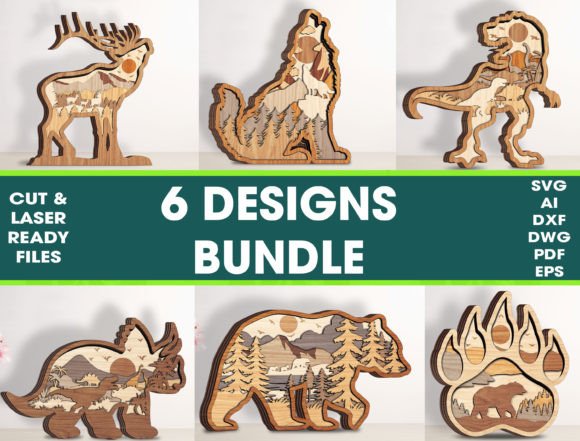
Bundle 6 Design Layered Animal Cut File for Laser Projects
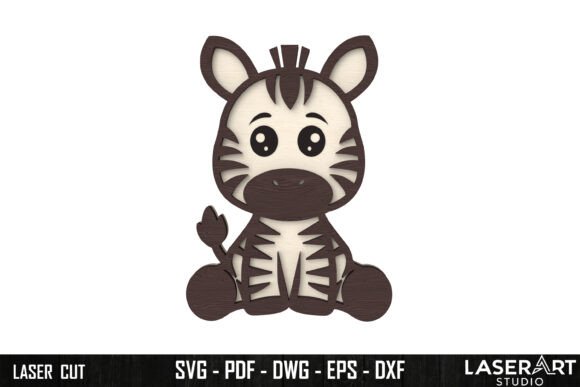
The Bundle 6 Design Layered Animal Cut File is a digital asset that brings creative energy to laser cutting and engraving projects. This layered file allows users to craft stunning 3D applications with ease, making it perfect for both personal and commercial use. Whether you're a seasoned designer or just starting out in the world of laser crafting, this cut file offers an accessible yet impactful way to bring your artistic vision to life.
What Is Included in the Bundle?
The package comes as a ZIP file, containing multiple formats to suit various software and machines. Specifically, you'll receive:
- SVG – Scalable Vector Graphics, ideal for most design programs
- DXF – Drawing Exchange Format, commonly used in CAD software
- AI – Adobe Illustrator format for advanced editing
- EPS – Encapsulated PostScript for professional print and vector work
- PDF – Portable Document Format for reference and layout
- DWG – AutoCAD format for architectural and engineering applications
Additionally, the file is color-coded for easy identification: Red for cutting and Blue for engraving. These settings are optimized for laser machines like Glowforge, Silhouette, Cricut, Brother, Inkscape, and any other program that accepts SVG files. You can adjust these settings based on your specific machine's requirements and material preferences.
Size and Simplicity
The animal design stands 10.5 inches tall, offering a generous scale without being overly large. Its size makes it suitable for a range of applications, from wall art and educational displays to product packaging and promotional materials. The design is also built with efficiency in mind—easy to assemble and highly economical. It’s an excellent choice for those looking to produce items at scale while maintaining quality and detail.
Creative Applications and Ideas
This layered cut file isn't limited to one type of project. Its versatility opens the door to many possibilities. Here are some ideas to spark your imagination:
Home Decor & Wall Art
Create eye-catching wall art by layering the animal pieces onto wood, acrylic, or MDF. The depth provided by the layers adds a dynamic visual effect. For a personalized touch, consider engraving names or dates into the base panel before assembly. These pieces make wonderful additions to nurseries, kids' rooms, or even office spaces where creativity is celebrated.
Custom Merchandise and Branding
Entrepreneurs and small business owners can leverage the design for branded merchandise. Think custom keychains, phone cases, or wooden trivets featuring the layered animal silhouette. By incorporating your brand logo or slogan into the engraving, you create a unique product that stands out in the market. This is especially effective for eco-friendly or artisanal product lines.
Event Signage and Party Decor
Marketers and event planners can use the animal designs to create themed signage for events such as birthdays, baby showers, or animal-related festivals. The layered structure adds a sense of movement and interest, drawing attention to displays or entryways. Pair them with matching colors and fonts to maintain a cohesive look across all event elements.
Educational Tools and Activities
Teachers and educators can integrate the cut file into classroom activities. Use it to teach geometry, symmetry, or basic anatomy through hands-on projects. Students can assemble the layers themselves, learning about spatial relationships and design principles in a tactile way. It's also a great tool for STEAM (Science, Technology, Engineering, Arts, Math) lessons involving measurements and patterns.
Gifts and Personalized Keepsakes
Hobbyists and gift givers will appreciate the ability to craft thoughtful, handmade gifts. Assemble the layers into a decorative box, picture frame, or shadow box. Add engraving details like messages, quotes, or dates to personalize each piece. These gifts can be tailored for different occasions—birthdays, holidays, or even as part of a subscription-based DIY kit.
How Different Users Can Adapt the Design
The beauty of the Layered Animal Cut File lies in its adaptability. Depending on your goals and audience, you can modify the design to fit various contexts and platforms:
For Creators and Artists
If you're focused on originality, consider using the AI or EPS files to tweak the animal shapes, add intricate patterns, or blend multiple designs together. You might incorporate textures, gradients, or even combine animals to form hybrid creatures. The file’s clean lines make it easy to customize without compromising clarity.
For Educators and Tutors
Use the PDF version as a guide for students. Print it out to demonstrate how layers interact, then have students recreate the design using their preferred materials. This approach fosters problem-solving skills and encourages experimentation with different tools and techniques.
For Entrepreneurs and Marketers
Integrate the design into your product line using mass production methods. Since it's easy to assemble and works well with laser machines, you can produce dozens of units efficiently. Consider adding a small pressing section—ideally around 1 1/4 inch—to create standalone items like coasters or mini sculptures that customers can easily handle and display.
For Bloggers and Content Creators
Share step-by-step tutorials on how to use the cut file. Highlight variations in materials, such as birch plywood, acrylic, or even leather. Include tips on adjusting laser settings for optimal results and offer downloadable templates for readers to try at home. This kind of content not only showcases your expertise but also drives engagement through interactive projects.
Design Tips for Clarity and Consistency
To ensure your final project looks polished and professional, keep the following recommendations in mind:
- Material Choice Matters: Opt for smooth, consistent materials like basswood or acrylic to highlight the precision of the cut file. Rough or uneven surfaces may detract from the overall appearance.
- Test Before Production: Always do a test run on a small piece of your chosen material. Adjust power and speed settings to match the thickness and type of material for clean cuts and engravings.
- Color Coding is Key: Stick to the red-blue system unless you have a specific reason to change it. This helps avoid confusion during setup and ensures accurate output.
- Assembly with Purpose: Use the recommended pressing section to create a stable base. This enhances durability and gives your finished item a more refined look.
- Keep It Organized: When modifying the design, label layers clearly and save versions of your edits so you can refer back if needed. This helps maintain consistency, especially when producing multiple copies.
Exploring Variations and Styles
While the original design features a classic layered animal, there are countless ways to reinterpret it:
- Minimalist Style: Simplify the layers by using just two or three. Focus on bold outlines and subtle engravings to create a modern aesthetic.
- Rustic Look: Choose untreated wood and leave natural imperfections visible. A matte finish and warm tones can give the design a cozy, handcrafted feel.
- Modern Pop: Use bright acrylics and metallic accents to give the design a vibrant, contemporary edge. This works especially well for urban-themed decor or boutique branding.
- Interactive Elements: Add hinges or moving parts to certain layers, turning static art into a kinetic sculpture. This can engage viewers and add a surprising dimension to your work.
- Themed Collections: Combine multiple animals from similar species or ecosystems to build a collection. This could represent wildlife conservation, zoo themes, or children's educational sets.
Getting Started with Your Project
If you're new to laser cutting, don’t worry—the Bundle 6 Design Layered Animal Cut File is designed for simplicity. Start by importing the SVG file into your preferred design software. Check the color codes to identify which sections need cutting and engraving. Once imported, review the dimensions and alignment to ensure everything fits properly when assembled.
When working with Glowforge or other laser machines, remember to calibrate the height of your material. This prevents misalignment and ensures clean, precise cuts. If you’re engraving text or images, place them carefully within the designated blue areas to avoid overlapping with cut lines.
Mass Production Made Simple
One of the standout features of this design is its suitability for mass production. Because the layers are pre-aligned and scalable, you can produce several units quickly and consistently. Just set up your laser machine with the correct parameters and let it do the work. This is especially helpful for holiday markets, pop-up shops, or online stores looking to expand their product offerings without investing heavily in time or resources.
To streamline the process, consider using automated nesting software to maximize material usage. This reduces waste and saves costs over time. Also, keep spare parts on hand for damaged or broken layers—this ensures continuity in production and customer satisfaction.
Final Thoughts and Inspiration
The Bundle 6 Design Layered Animal Cut File is more than just a template—it’s a foundation for creativity. Whether you're designing for a client, creating something for your home, or experimenting with new styles, this file provides the flexibility and quality needed to succeed. Its layered structure invites exploration, while its compatibility with major laser systems ensures accessibility for a wide range of users.
As you begin your project, remember to stay open to variation. Try different materials, play with color schemes, and don’t be afraid to push the boundaries of what this design can become. With thoughtful planning and a bit of imagination, you can transform a simple cut file into a meaningful, beautiful creation that resonates with your audience.
We hope this inspires your next project. Have a nice day!